

Product and application illustrations. Follow the product label and written use guidance.
CleenU product solution
Gaming Station Electronics Cleaner
Neutral, fast-drying · Spray the cloth · Private label
Shiny WASD and space keys and a black film on the mouse? Power down, spray a microfiber cloth, and wipe key by key; it dries in 1–2 minutes to matte keycaps and a dry grip, with no liquid in the switches. Private label from 500 bottles.
- New keycaps are matte. The shine on WASD and the space bar over time isn’t wear; it’s hand oil, salt, and skin cells filling the fine texture of the keycap. That oil film collects dust and turns into dark grime on mouse sides and controller grips. The surfactants and a little fast-evaporating solvent in this cleaner dissolve the film so a cloth lifts it and the matte feel comes back.
- Liquid in switch gaps and ports is what electronics fear most. Power off or unplug, spray a microfiber cloth until just damp, and then wipe keycaps, mice, and controllers. The formula evaporates in 1 to 2 minutes, so nothing pools in the switches, and its neutral pH is gentle on ABS and PBT keycaps and soft-touch controller coatings.
- MOQ
- 500 bottles
- Free samples
- 3–5 days
- Bulk lead time
- Scheduled with the order

Product value
What does Gaming Station Electronics Cleaner clean?
Gaming Station Electronics Cleaner handles everyday cleaning of keyboards, mice, controllers, headset shells, and gaming desks, removing hand-sweat shine, fingerprints, and snack residue.
View product detailsProduct summary
- Product type
- PH-neutral, fast-drying electronics surface cleaner
- Intended use
- Hand oil and fingerprints on keyboards, mice, controllers, headsets, and desks
- Formula
- Nonionic surfactants with fast-evaporating solvent, pH 6.5–7.5; no ammonia, bleach, or abrasives; ready to use.
- For
- Internet-café and gaming-hotel chains, gaming peripheral brands, cleaning product brands, ecommerce sellers

Before & after
Before and after (use illustration)
Before: an internet-café keyboard’s WASD and space bar are shiny with dark grime at the edges, and the mouse sides show clear handprints. After: powered off and wiped key by key with a dampened microfiber cloth, the keycaps are matte and clean and the mouse feels dry.
- Before: shiny WASD and space keys with black grime at the edges
- After: matte keycaps and clean edges
- Dry grip on mice and controllers, ready in 1–2 minutes
How it works
How Hand Grime Wipes Away
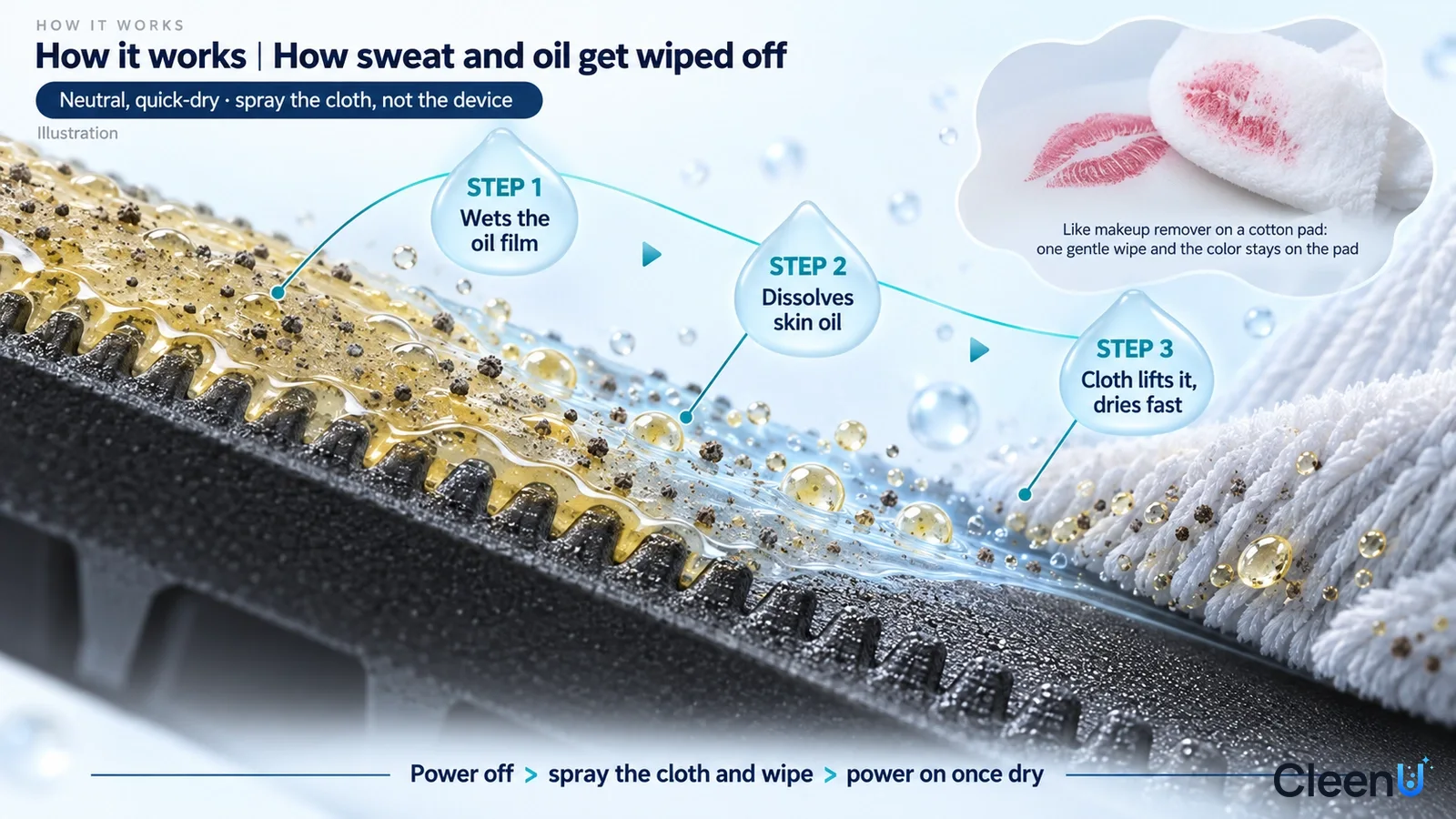
Grime on keycaps and controllers is skin oil, sweat salt, and dust. Nonionic surfactants lower surface tension so the cleaner spreads across plastic and emulsifies the oil, while a little fast-drying solvent helps dissolve the film and speeds evaporation. Microfiber picks up the emulsified oil and dust, and what’s left evaporates in 1 to 2 minutes for a dry, non-sticky surface.
- Wet the oil film
- Solvent and surfactants dissolve skin oil
- Microfiber picks up
- Fast evaporation, no liquid left
Usage guidance
Use guidance
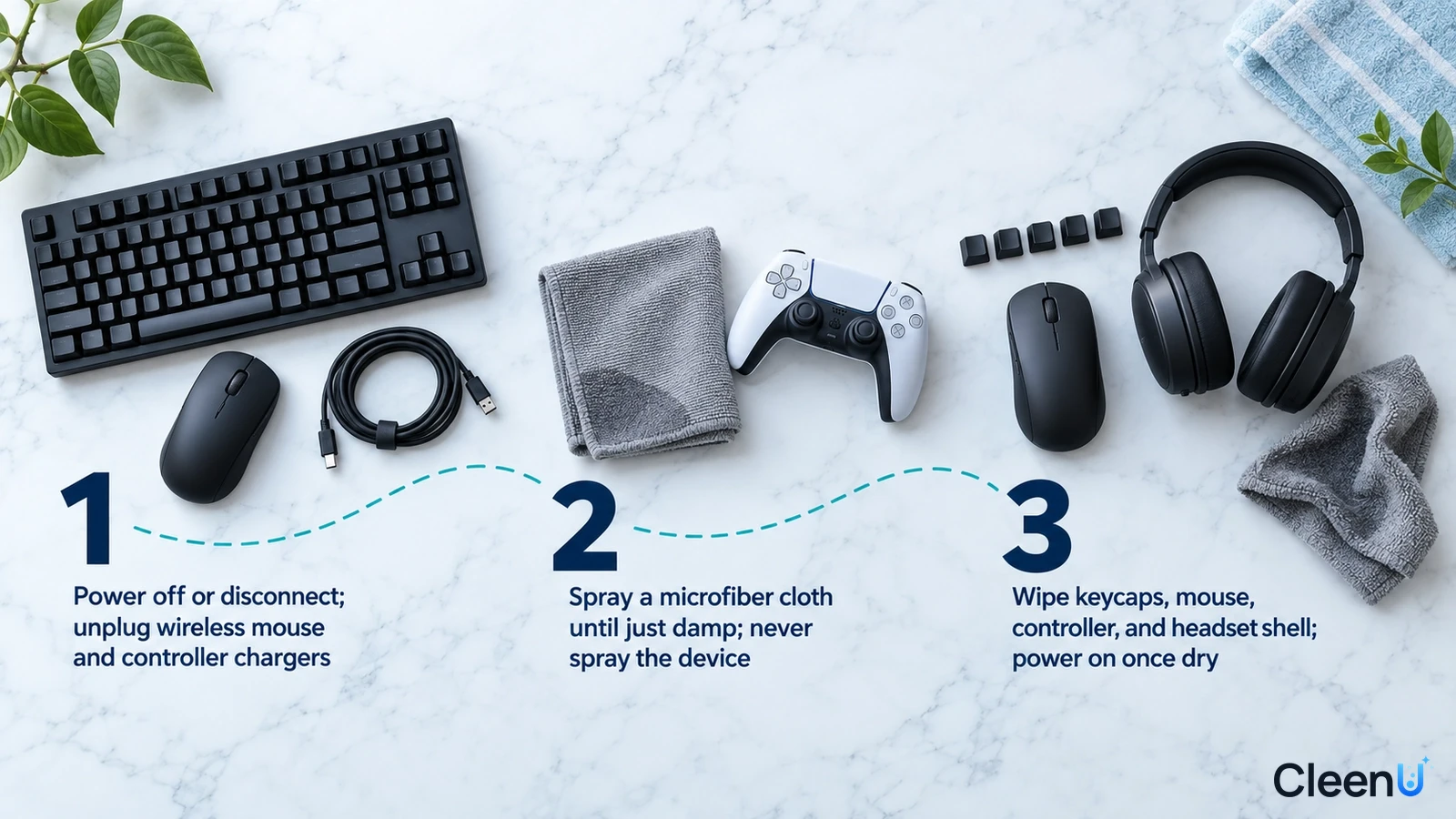
- Power off or unplug the device and disconnect charging cables.
- Spray a microfiber cloth until just damp; never spray the device directly.
- Wipe keycaps, mice, controllers, and headset shells, running a cloth corner between keys; power on after 1 to 2 minutes of drying.

Before you use it
Important notes
- Not for: Monitors and screens
- Not for: Cleaning while powered
- Not for: Spraying devices directly
- Not for: PC interiors and circuit boards
- Not for: Fabric ear cushions and upholstered chairs
Product comparison
How to choose a Gaming Station Electronics Cleaner
Hand grime on keyboards, mice, and controllers: Gaming Station Electronics Cleaner. Monitors and phone screens: Screen Cleaner. Large desk surfaces: Desk Cleaner.
View product comparison
| Decision point | Gaming Station Electronics Cleaner | Household wet wipes |
|---|---|---|
| Oil removal | Dissolves skin oil | Mostly smears |
| Drying | 1–2 minutes | Wetter, can leave marks |
| Residue | Non-sticky | Some leave a tacky film |
| Cost | One bottle covers hundreds of stations | Per-wipe cost |
Where Gaming Station Electronics Cleaner stands out
Shiny Keycaps Are Worn In by Hand Oil
New keycaps are matte. The shine on WASD and the space bar over time isn’t wear; it’s hand oil, salt, and skin cells filling the fine texture of the keycap. That oil film collects dust and turns into dark grime on mouse sides and controller grips. The surfactants and a little fast-evaporating solvent in this cleaner dissolve the film so a cloth lifts it and the matte feel comes back.
Spray the Cloth, Not the Device, and It Dries Fast
Liquid in switch gaps and ports is what electronics fear most. Power off or unplug, spray a microfiber cloth until just damp, and then wipe keycaps, mice, and controllers. The formula evaporates in 1 to 2 minutes, so nothing pools in the switches, and its neutral pH is gentle on ABS and PBT keycaps and soft-touch controller coatings.
Who it's for, where it's used, and when not to use it
For
End-use scenarios
When not to use it
Product Specifications and Custom Options
Key product details and custom options for your project.
Product specifications
Product type, cleaning scope, and format.
| Product type | PH-neutral, fast-drying electronics surface cleaner |
| Surfaces | Keyboards, mice, controllers, headset shells, and gaming desks |
| Use scenarios | Internet cafés and gaming hotels; Esports venues and events; Home gaming setups |
| Target soils | Hand oil and fingerprints on keyboards, mice, controllers, headsets, and desks |
| Directions | Ready to use; spray onto a cloth; no dwell; air-dries in 1–2 min |
| Not for | Monitors and screens; Cleaning while powered; Spraying devices directly; PC interiors and circuit boards; Fabric ear cushions and upholstered chairs |
| Size and packaging | 500 mL trigger spray bottle |
| pH | pH 6.5–7.5 at 25°C |
| Scent | Unscented |
| Shelf life and storage | 24 months unopened; keep tightly closed in a cool, dry, well-ventilated place. Protect from heat, direct sunlight, and freezing |
B2B custom options
Private label, packaging, MOQ, samples, and delivery.
| OEM/ODM and private label | From product direction and sample review to packaging, production, and delivery for your Gaming Station Electronics Cleaner project. |
| Packaging and labels | Mist trigger / foam trigger, fill size, labels, and retail sets can be customized |
| Case pack | 12 × 500 mL per case |
| MOQ | 500 bottles |
| Sample time | Free sample: 3–5 days |
| Bulk lead time | Scheduled with the order after packaging and label approval |
| Documents | SDS/MSDS, TDS, and batch COA provided per project on inquiry |
OEM/ODM project process
Move from product direction and sample review to packaging, production, and delivery for Gaming Station Electronics Cleaner.
Define the customer
Decide B2B bulk packs for venues or small retail bottles with cloths for gamers.
Free sample
A free sample is usually ready in 3–5 days for project review.
Packaging and labels
Set fill size, trigger type, label language, the warnings your market requires, and spray-the-cloth, never-the-device, and power-off instructions.
Bulk delivery
Standard MOQ is 500 bottles; bulk orders are scheduled after packaging and labels are approved.
Why choose CleenU for Gaming Station Electronics Cleaner?
From product positioning and samples to packaging and repeat supply, CleenU supports OEM/ODM projects built around Gaming Station Electronics Cleaner.
Drying speed balanced with oil removal
Solvent level sets drying time and oil removal and affects soft-touch coatings and keycap legends.
Fine mist plus cloth
A fine mist dampens cloths evenly; add microfiber and a keycap brush for a gamer kit.
Sample reviews with clear criteria
Review samples on your ABS/PBT keycaps and soft-touch controller samples with hand grime against clear points: hand-oil removal, drying time, and effect on keycap legends and soft-touch coatings.
Mostly unscented
Venues are enclosed, so unscented or very light scents work best.
Labels and documents
We supply bilingual labels, SDS/MSDS, TDS, and batch COAs, with spray-the-cloth, never-the-device, and power-off instructions on the label, and can arrange third-party testing for your market.
Consistent supply and reorders
Each batch is retained and ships with a COA, so reorders match in color, scent, and feel.
Packaging and labeling options
Plan packaging format, label language, and shelf presentation around Gaming Station Electronics Cleaner and your target channel.
Show packaging and label options
Packaging options
Core size: 500 mL trigger spray bottle. Also available: 1 L household refill, channel case packs, and ecommerce bundles with microfiber cloths and a keycap brush. Mist trigger or foam trigger options, with labels and cartons made to your brand.
Supporting Documents and Materials
Purchasers usually confirm whether the materials are complete before formal cooperation. Preparing documents in advance helps with quoting, sampling, and channel review.
Show available documents
Project documents
When you inquire, we provide SDS/MSDS, a TDS, batch COAs, label directions, and packaging files for your project.
Related products, solutions, and articles
Explore related cleaning products, application guidance, and OEM/ODM resources for Gaming Station Electronics Cleaner.
Frequently asked questions (FAQ)
Find practical answers about Gaming Station Electronics Cleaner, private label, samples, MOQ, documents, and delivery.
How to use
Can I get shiny keycaps back to matte?
Mostly, yes. The shine is oil filling the texture, so wiping each key with a dampened cloth brings the matte feel back. True physical wear can’t be undone.
Can I spray it directly on the keyboard?
No. Liquid runs down between keys into switches and the board. Always spray the cloth first.
Can I use it on my monitor?
Not recommended; monitors have anti-glare coatings. Use a screen cleaner and keep this for keyboards, mice, controllers, and desks.
What's the best way to clean a mechanical keyboard?
Unplug it and pull the keycaps with a keycap puller. Soak the caps in warm water with a drop of dish soap, then let them dry completely. Clean the switches and plate with a soft brush and compressed air only, with no liquid. Wipe the case, wrist rest, and reinstalled keycaps with a dampened cloth, and make sure the caps are fully dry before they go back on.
Can I use it on a MacBook or Apple keyboard?
Yes, on the key tops and palm rest. Shut the computer down, spray a microfiber cloth until it's damp but not dripping, and wipe. Don't pry off scissor or butterfly keys; blow dust out of the gaps with compressed air held at an angle. Use a screen cleaner, not this, on the display.
Surfaces and common questions
How often should an internet café clean?
Keyboards and mice after every customer; controllers and headsets at least daily; desks every shift.
How soon can I power back on?
With a just-damp cloth it dries in 1 to 2 minutes; power on once the surface is dry to the touch.
Will it damage soft-touch controller coatings?
The neutral formula is gentle on soft-touch finishes; wipe lightly. Don’t scrub coatings that are already sticky or peeling from age.
How do I get crumbs and dust out from between the keys?
Turn the keyboard over and tap it, then use a soft brush or compressed air to clear the gaps. After that, wipe the keycaps with a dampened cloth. Never spray into the gaps.
Can I clean headset shells and mics?
Plastic and metal shells, yes—wipe with a dampened cloth. Keep mic grilles and speaker openings dry, and don’t use it on fabric or protein-leather ear cushions.
With lots of stations, what’s the most efficient routine?
Wipe at checkout: once a station is off, do the keyboard, mouse, and desk with a sprayed cloth—a minute or two each. Do a deep clean weekly after closing, including key gaps and headsets.
Is this an electrical contact cleaner?
No. It removes hand grime and fingerprints from the outside of keyboards, mice, and controllers. Oxidized pots, pins, and circuit-board contacts need a dedicated contact cleaner used with the power off. Don't spray this product inside any device.
Buying and private label
What should we decide first for a private-label gaming station electronics cleaner?
Three things: B2B bulk packs for cafés and gaming hotels or small retail bottles for gamers; whether to include microfiber cloths and a keycap brush; and unscented or a light fresh scent. Venues care about cost per wipe and drying speed; gamers care about packaging design.
What are the sample, MOQ, and lead-time terms?
Free samples are usually ready in 3–5 days. Standard MOQ is 500 bottles, and bulk orders are scheduled after packaging and labels are approved.
What can be customized?
All of it: formula direction, scent, fill size (500 mL spray, 1 L refill, and more), mist or foam trigger, label design and language, and ecommerce bundles with microfiber cloths and a keycap brush.
Can we test samples first?
Yes, we ship samples first. Test them on ABS/PBT keycaps and soft-touch controller samples with hand grime like the ones your customers handle, and record hand-oil removal, drying time, and effect on keycap legends and soft-touch coatings. That tells you more than a before-and-after photo.
Which documents can you provide?
We provide SDS/MSDS, a TDS, and batch COAs, plus bilingual label content for your target market. They aren’t posted publicly; we send them per project on inquiry.
How is private-label pricing quoted?
Pricing is tiered by packaging, trigger or cap, label, and order quantity, starting at the 500-bottle MOQ. Send your target quantity, fill size, and packaging needs, and we’ll quote unit prices by volume tier with sample and lead-time details.
Launching your own Gaming Station Electronics Cleaner?
Send us your customer type (venues or retail gamers), packaging, and estimated volume. We will work through formula and kit with you.