
How-to
Robot Vacuum Cleaning Solution & Maintenance Guide: How Often to Clean the Tanks, Dock and Pads
Direct answer
Maintain a robot vacuum in three layers: after every run, empty the dirty water tank and let it air-dry; every week, scrub the dock's wash tray, filter and mop pads and rinse the clean tank; every month, wipe sensors and contacts and check outlets and auto-dosing. Replace consumables per your manual.
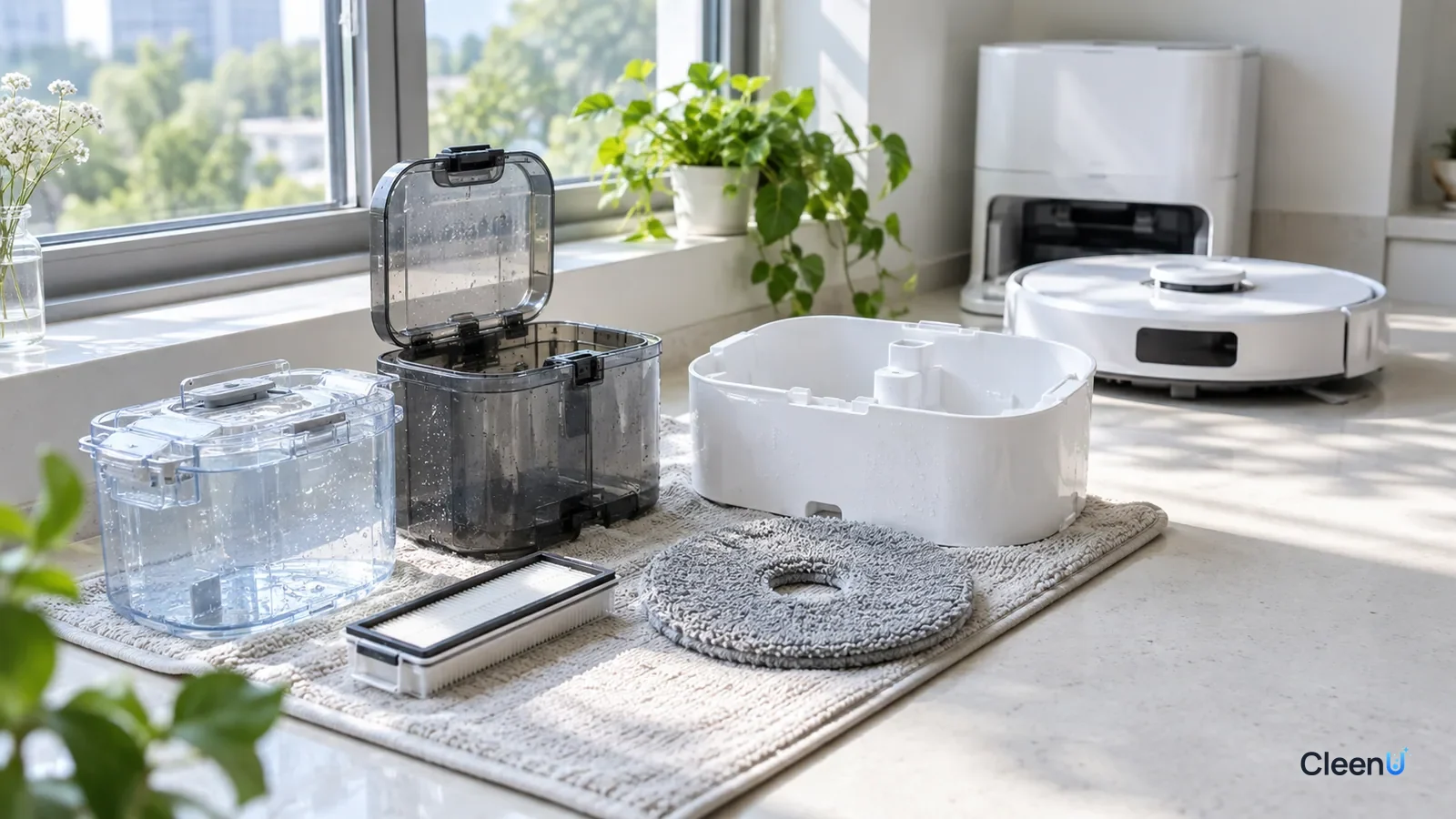
A low-foam, wax-free robot mop solution dosed lightly at the label ratio makes all of this easier. If something has already gone wrong, start with the problem table below and jump to the matching troubleshooting guide.
This page is the hub of the CleenU Robot Vacuum Cleaning Solution & Maintenance Guide. A robot mop with a self-cleaning dock is really a small machine that handles dirty water every day: the dock washes filthy pads, pumps the wastewater into a dirty tank, then keeps mopping with water from the clean tank. Skip any one piece of upkeep and a specific problem shows up. The intervals below assume a typical home that mops once a day. Brands and models are built differently, so your manual has the final word.
My problem: which guide to read first
The maintenance schedule: what to do for each part, and how often
| Part | What to do | How often |
|---|---|---|
| Dirty water tank | Empty, rinse, and air-dry with the lid open before reinstalling | After every run |
| Dock wash tray and filter | Remove and scrub off hair and slimy film with a soft brush, then dry | Weekly; every 3 to 4 days with pets or in humid weather |
| Clean water tank | Dump leftover water, rinse, and dry open; use up mixed solution the same day | Weekly |
| Auto-dosing tank | Pour out old solution and rinse the tank and outlet with warm water | When you switch solutions; otherwise per your manual |
| Mop pads | Let the dock wash and dry them; hand wash, rinse well and dry fully, no fabric softener | Hand wash weekly |
| Outlet holes and water lines | Check that pads wet evenly; clear outlets as your manual describes | Monthly |
| Main brush, side brushes, dust bin filter | Cut away tangled hair; tap or wash the filter | Weekly; more often with pets |
| Sensors and contacts | Wipe sensor windows, charging contacts and tank level contacts with a damp soft cloth | Monthly |
| Pads, brushes, dust bags, filters | Replace when worn, or still dark and smelly after cleaning | Per your manual |
With cats or dogs, a greasy kitchen, or a humid season, move the weekly tasks up to every three or four days. How often you mop also changes the rhythm; see how often you should run your robot mop.
The weekly deep clean, in the order that saves the most time
Dock
Unplug the dock and take everything apart
Unplug the dock, then pull out the clean tank, dirty tank, wash tray and filter, and remove the mop pads. Take it all to the sink first so everything can dry together afterward.
Start with the dirtiest parts
Empty the dirty tank, then use a soft brush on the tank walls, the lid seal, the grooves of the wash tray and the filter to remove hair, grit and slimy film. Rinse clean and wipe the dock base with a damp cloth.
Caution:Don't soak tanks or the tray in chlorine bleach; it can damage seals and plastic parts.
Rinse the clean water tank
Dump any water that has been sitting for days and rinse the tank twice. If the walls feel slippery, give them a quick scrub.
Robot
Hand wash the pads and clear the brushes
Wash the pads in water with a little laundry detergent and rinse until the water runs clear. Cut hair and pet fur off the main brush and side brushes.
Air-dry everything before reassembling
Leave tank lids open and pads spread out somewhere airy until fully dry, then reinstall. Putting parts back wet is a common reason a freshly cleaned dock smells again within days.
Signs you should clean more often
- The dirty tank smells sour or fishy when you open it
- Black, slimy film or mold spots appear in the wash tray or on the filter
- Pads stay gray, stiff or smelly after washing
- The dock reports a full dirty tank before it is actually full
- Floors show white spots or streaks, or feel sticky once dry
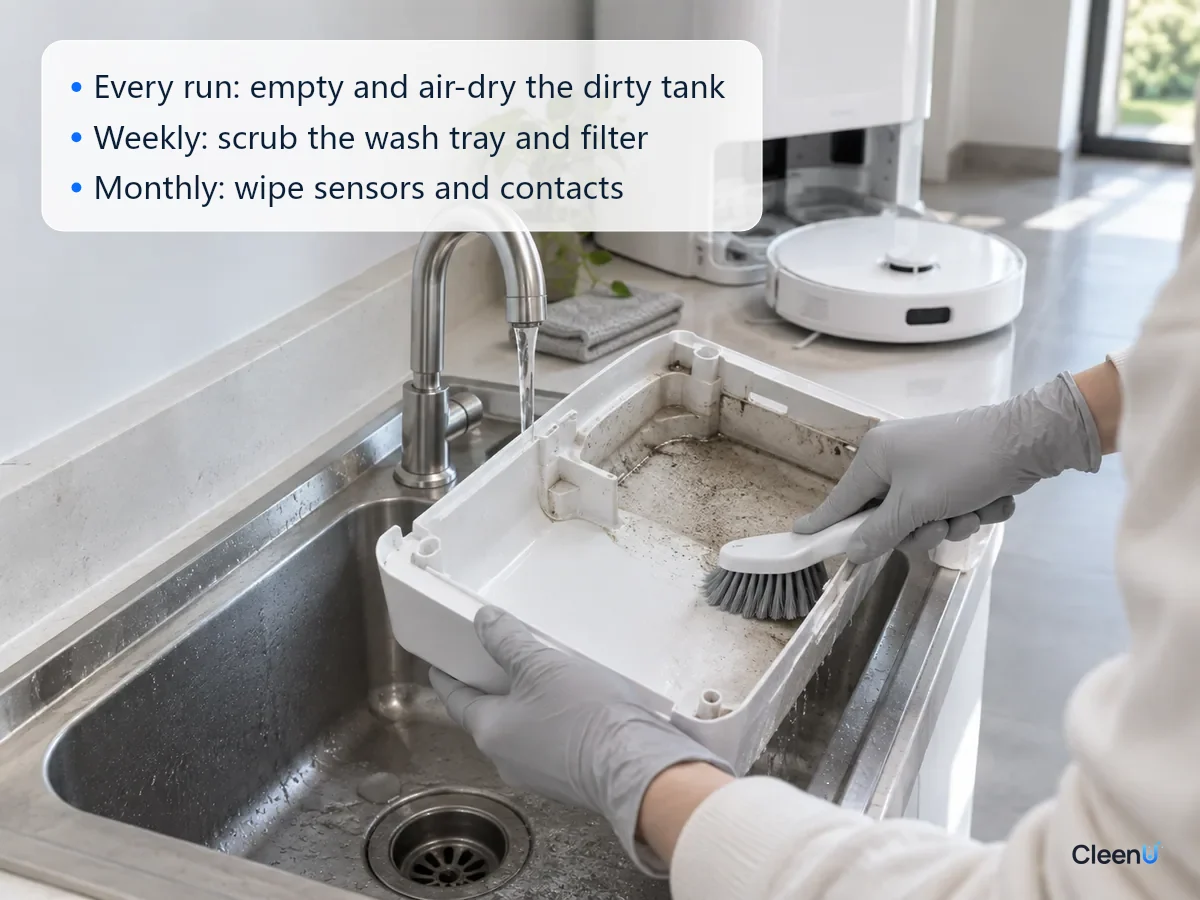
Dirty water tank: empty and dry it after every run
How to do it
When mopping finishes, pull out the dirty tank, pour it out, give it a quick rinse, and set it somewhere airy with the lid open before putting it back. During the weekly clean, scrub the walls, lid and seal with a soft brush.
How often
After every run. The dirty tank holds the dust, hair, skin flakes and food crumbs washed off your floors, and bacteria multiply fast in a warm, damp, closed-up dock. Wastewater left overnight can already smell. Emptying without drying isn't enough either: the film of water and organic matter left on the walls turns sour once the tank is back in the dock.
Common problems
If the tank already smells, do one thorough clean following why a robot vacuum dirty water tank smells and how to keep it fresh. Not sure whether it's sour, fishy or musty? Find the odor source by the smell. Don't pour cleaning solution or deodorizer into the dirty tank to mask the smell; it only covers it for a while and can create foam.
If the dock says the tank is full when it isn't, foam from the cleaning solution or grimy level contacts are the usual triggers; see why the dirty tank full alert goes off early. That's also why robot mop solutions are made low-foam, as explained in why robot mop cleaning solution has to be low-foam.
Dock wash tray and filter: scrub weekly, rinsing isn't enough
How to do it
Remove the wash tray and filter from the bottom of the dock. Scrub back and forth with a soft brush and water to lift off hair, grit and the slimy film, then rinse, dry and reinstall.
That slimy film is biofilm. Bacteria settle on the plastic, multiply, and release sticky polysaccharides and proteins that wrap themselves and the dirt in a protective layer. Running water strips only the outer layer; the layer bonded to the plastic has to be scrubbed off. Drying afterward matters just as much, because once the surface is fully dry, the few bacteria left behind struggle to rebuild the film.
How often
Weekly for most homes, and every three or four days with pets, a greasy kitchen or humid weather. Biofilm gets harder to remove with age. A film a day or two old comes off with a light brushing; leave it a few weeks and it thickens, darkens and works into the filter mesh and tray grooves, so it needs soaking and repeated scrubbing. A quick weekly scrub is far easier than a big monthly cleanout.
Common problems
For black slime in the tray or a moldy filter, follow black slime in the robot vacuum base station tray: what it is and how to clean it. Skip bleach soaks; whether you can put vinegar or bleach in a robot mop tank explains why.
Clean water tank: rinse weekly and mix solution fresh
How to do it
Pour out water that has been sitting for days, rinse the tank, and let it dry with the lid open. If you add cleaning solution, mix it the day you mop and use it up; don't fill the tank and leave it for a week.
How often
Weekly. It only holds clean water, but the chlorine in tap water gradually escapes as it sits, giving the few bacteria in the water a chance to grow, and over time the walls turn slippery and musty. Diluted solution is less protected too, because diluting a cleaner also dilutes its preservative system; see why robot mop cleaning solutions need preservatives.
Common problems
For a musty clean tank, see how to clean a robot vacuum clean water tank that smells musty. What you put in the tank also affects upkeep: tap, filtered or distilled water, whether hot water is OK, and whether essential oils or pet odor eliminators belong in the tank each have their own guide.
Auto-dosing tank: clean it when you switch solutions
How to do it
Docks with auto-dosing have a separate detergent tank. Before switching to a different solution, pour out the old one, rinse the tank and its outlet with warm water, let it dry, then refill. In between, watch the fill opening and outlet for crusting or stickiness.
How often
Every time you change solutions, and otherwise on the schedule in your manual. The full method is in how to clean the auto-dosing tank on a robot vacuum base station.
Common problems
When auto-dosing stops dispensing, a solution that is too thick, crystallized, or a clogged port is the usual cause; see robot vacuum auto-dosing not dispensing. If the dock ignores a new solution or says it can't detect it, see robot dock not using the cleaning solution. If it says detergent is low right after a refill, see robot vacuum says detergent is low right after you refilled it. Don't mix brands in the same tank; can you mix different brands of robot mop cleaning solution explains why.
Mop pads: let the dock wash them, hand wash weekly
How to do it
Between runs, let the dock wash and dry the pads. Once a week, take them off, hand wash them in water with a little laundry detergent, rinse until the water runs clear, and dry them completely. Skip fabric softener, which leaves a film on the fibers that cuts absorbency.
How often
Hand wash weekly. Replacement intervals vary by brand, so follow your manual; when pads stay dark, stiff or smelly after washing, or look worn and matted, it's time for new ones.
Common problems
For washing and replacement tips, see smelly, graying robot mop pads. If pads stay dry after you add solution, see robot mop pads staying dry after adding solution; for fibers on the floor, see robot mop leaving lint; if floors still look dirty, see robot mop not cleaning well. Roller mops and spinning pads use solution differently, as covered in roller mop vs spinning pads.
Outlet holes, water lines and floor marks: check monthly
How to do it
While the robot mops, check that the pads get evenly damp. If one side stays dry or flow is uneven, scale or cleaner residue may be clogging the outlet holes; clear them with a soft pin or water as your manual describes. White spots, streaks and stickiness on the floor are often the visible side of the same water and dosing problems.
How often
Monthly. Hard water scales faster, so check every two or three weeks if your water is hard.
Common problems
White spots after mopping usually point to hard water; see white spots after robot mopping and the chemistry behind it in what chelating agents do. For streaks, start with the dose in streaks after robot mopping; for circular marks, see swirl marks after robot mopping. Sticky or slippery floors usually mean residue; see sticky floors after robot mopping and floors slippery after robot mopping. For cloudy wood, see hazy wood floors after robot mopping.
Brushes and sensors: clear hair weekly, wipe contacts monthly
How to do it
Cut and pull hair and pet fur off the main brush and side brushes. Tap the dust bin filter clean, or wash it if your manual says it's washable. Wipe the sensor windows, cliff sensors, charging contacts and the dirty tank's level contacts with a slightly damp soft cloth.
How often
Brushes and the dust bin filter weekly, with the main brush every two or three days in pet homes. Sensors and contacts monthly.
Common problems
Grime on contacts can cause false "tank full" alerts or charging problems. If suction drops, check the dust bin filter for clogging first. Replace the main brush when bristles are short or flattened, side brushes when they splay or shed, and the filter when suction stays weak after cleaning, on the schedule in your manual.
Adjusting maintenance for your home and floors
Pet homes
Fur, dander and drool tangle brushes and filters faster and load the dirty tank with more organic matter, so clear the main brush every two or three days and scrub the wash tray and filter every three or four days. Never let the robot mop through urine or vomit; clean those up by hand first, in the order described in can a robot mop clean up pet urine. More tips: robot mopping in a pet home, pet-home vs regular robot mop solution, when your dog licks the floor after mopping, and what to check in a solution if you have cats.
Homes with a crawling baby
Residue is the main concern: dose on the light side and let floors dry fully before the baby crawls; see robot mopping in a home with a crawling baby.
Humid weather
In humid stretches, the dirty tank, wash tray and pads all dry slowly. Dry the dirty tank and pads after every run, scrub the tray and filter every three or four days, and keep the dock somewhere with airflow rather than in a closed cabinet. Setting changes are in robot mopping in humid weather.
Different floors and situations
Hardwood needs less water, and tile and luxury vinyl plank, marble, mixed rugs and hard floors, and radiant floor heating each have their own settings. For oily footprints, see using a robot mop on a greasy kitchen floor; for darkening grout, see grout lines getting darker after robot mopping. After a renovation, read the first robot mop run after a renovation before you start, because construction dust clogs pads and water lines quickly.
Cleaning solution: the right one, used the right way, halves the upkeep
The right solution used the right way makes maintenance easier; the wrong one multiplies it. Too much solution leaves residue in pad fibers, the wash tray and the lines, clogs outlet holes faster, and builds foam in the dirty tank that can trigger false "full" alerts. Dish soap and ordinary high-foam floor cleaner keep foaming inside the dock. Products with wax or particles can settle in lines and outlet holes.
How to do it
Pick a low-foam robot mop solution with no wax and no particles, add it to the clean tank or the dock's designated detergent compartment at the label ratio, and go light. If you're starting out, follow setting up your robot mop for the first time. For choosing and dosing, start with the robot mop cleaning solution guide, where cleaning solution goes in a robot vacuum, how much to add, and whether plain water is enough.
How often
Dose at the label ratio every time you fill, and use up mixed solution the same day. Keep the bottle capped and out of direct light. Stop using a solution that has changed color, separated or swollen the bottle; see solution changed color or separated, bulging bottle or yellowed solution, and solution that froze over the winter. Before leaving the robot unused for weeks, empty and dry it as described in storing a robot vacuum for weeks.
Common problems
Substitutes: regular floor cleaner in a robot mop, dish soap in a robot mop, and robot mop vs wet-dry vacuum solution. Choosing: brand-name vs third-party solution, whether third-party solution voids the warranty, concentrate vs ready-to-use cost per run, why cheap solution can cost more, neutral vs mildly alkaline, and scented vs fragrance-free. Cleaning vs disinfecting: does robot mop solution disinfect floors and robot mop solution vs disinfecting floor cleaner. How it works: does low-foam mean weaker cleaning, how robot mop solution lifts footprints and oily film, and a shake test you can do at home. Other uses: with a regular mop and in a steam mop. Accidents: a strong chemical smell after mopping and solution on your skin or in your eyes.
Follow-up questions about robot vacuum maintenance
Can I soak the tanks in bleach?
Better not. Chlorine bleach can damage seals and plastic parts, and leftovers can get into the lines. Scrubbing with water and a soft brush, then drying open, is enough.
My dock dries the pads. Do I still need to take them off?
Not every day. But take them off and hand wash them weekly to clear out the soil and residue that build up in the fibers.
If I use cleaning solution, can I clean the dock less often?
No. Solution helps clean your floors; it doesn't replace cleaning the dock and tanks. Overdosing actually adds residue and makes maintenance more frequent.
I cleaned everything, but my robot still smells. What did I miss?
Check the parts people skip: the corners of the wash tray, the filter, the pad holders, and the seal on the dirty tank lid. Buildup left there starts to smell again within days. Scrub them, let everything air-dry fully, and wash or replace the pads.
What should I check before using a third-party cleaning solution?
First confirm in your manual that solution can go in the clean tank or detergent compartment. Then choose a low-foam robot mop solution with no wax or particles, dose at the label ratio, and on the first run watch for foam, water flow and floor residue.
Next step: pick a solution, or develop your own
To keep foam out of the dock and residue out of the pads and lines, for everyday mopping use a low-foam, wax-free, dilutable Robot Vacuum Cleaning Solution.
CleenU Robot Vacuum Cleaning Solution is a neutral, low-foam concentrate at pH 6.5 to 7.5, made with low-foam nonionic surfactants and a defoamer, with no wax, no chlorine and no particles; add about 10 to 20 mL to the clean water tank per fill. For homes with cats or dogs, see CleenU Robot Vacuum & Mop Floor Cleaning Solution for Pet Homes. For robot mops from Roborock, Ecovacs, Dreame, Narwal and iRobot, and floor washers such as Tineco, first confirm in your manual that cleaning solution is allowed, then add it to the clean tank or the dock's designated detergent compartment. CleenU isn't affiliated with these brands; the names only indicate compatibility. For bulk orders, ask CleenU for a quote or samples of the robot mop solution, or use the pet-home formula request.
For brands and sellers: development and testing
If you're a robot vacuum brand, a cleaning products brand or an online seller planning your own robot mop cleaning solution, these articles cover development and sourcing: concentrate, ready-to-use or auto-dose first, why samples keep failing on foam and residue, how to evaluate samples, testing against seals and tubing, stability testing, caps, dosing and leak prevention, choosing a scent, label claims to make and avoid, comparing manufacturer quotes, what the factory needs from a robot vacuum brand, and Amazon listing and compliance basics.
CleenU makes robot mop cleaning solution for OEM, ODM and private label, with a 500-bottle minimum for private label, and can run preservative challenge testing. Formula, scent and packaging can be adjusted for the target devices; lead times are confirmed in the formal quote. See CleenU OEM/ODM for how it works, and the robot mop solution sourcing guide for sampling and evaluation requirements.
Robot vacuum maintenance is easy once you split it into after each run, weekly and monthly. After every run, empty the dirty tank and let it dry open. Every week, scrub the wash tray and filter, hand wash the pads, rinse the clean tank and clear the brushes. Every month, wipe sensors and contacts and check outlets, water lines and the auto-dosing tank, and replace consumables on your manual's schedule. Shorten the intervals for pets, humid weather and greasy kitchens. A low-foam, wax-free solution used sparingly keeps foam and residue out of the dock and makes the whole routine lighter; when a specific problem shows up, follow the links in each section to the matching troubleshooting guide.